Instead of stacking the guest pass under mine, I made it a toggle. Testers picked it
Most testers preferred Version B: Just me and Guest pass side by side. Bringing a friend is one tap, and your own code never gets pushed off the screen.

East Village
98 Avenue A, New York
Washington Heights
4200 Broadway Suite 1.3, New York


Member ID ABCD1234567
 Add to wallet
occupancy level
number of visits
this year
 Add to wallet
occupancy level
75%number of visits
this year
bring a friend
4/5Visits
remaining
Valid until: Feb 1 2026
With your current membership you can bring friends to the gym to train together!

A self-initiated redesign of the PureGym member app.
Problem
Members used the app because they had to, not because they wanted to.
I asked members at the gym how they use the old app. Here is what they pointed at on the home screen.
“Search feels non-functional or misleading…”
“No clear login page… hard to change account”
“Buttons are not visually obvious or discoverable… Buttons contain too much text”
“QR code never shows up when you want to…”
“I hate the hierarchy…”
“Efficient but very ugly”
*Real comments, quoted or paraphrased from member interviews.
Challenge
Solution
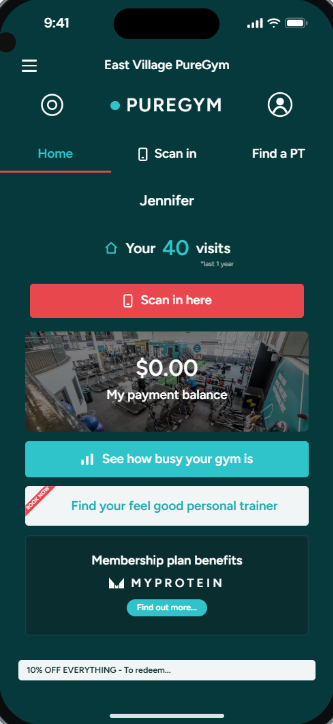
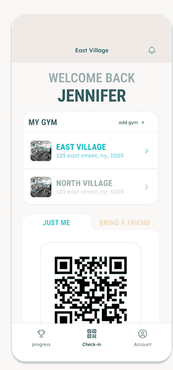
Your gym, your code, on the first screen.
Scroll to walk through the check-in screen piece by piece.
Gym switcher
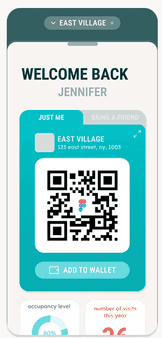
Save every gym you go to and swipe between them.
Just me / Guest pass
Side by side, not stacked. Testers picked this version.
The code is the home screen
Open the app and it’s already there.
Add to Wallet
Skip the app at the door entirely.
Decisions
Three calls that kept the check-in screen calm.
Instead of stacking the guest pass under mine, I made it a toggle. Testers picked it
Most testers preferred Version B: Just me and Guest pass side by side. Bringing a friend is one tap, and your own code never gets pushed off the screen.
Instead of one fixed gym, members keep a list. Version 3
Some members train at more than one PureGym. Saved gyms sit behind the gym name, and adding one is a search and a pin, not a hunt through every club in the city.
Instead of piling stats onto check-in, I gave them their own tab. From testing
One tester loved the achievements, another didn’t care. So hours, streaks and achievements live in Progress, and check-in stays the code and how busy the gym is.
Iterations
Three versions, each one asking a smaller question.
Testing
Seven members caught what I missed.
I put the prototype in members’ hands at the gym. Two changes came straight from them.
“It would help if the colours of the bars matched how busy it is.”
Before, every bar was teal. After, busy hours turn coral and quiet ones stay teal.
Stacked under your pass, or side by side?
Most testers picked B, side by side. It became the Guest pass toggle.
Final design
Everything else a member needs is one tap from the code.
Checking in
Scan in through the QR code, save your pass to your digital wallet, and check in a friend straight from the same screen.
Viewing gym info
Tap the gym card and it drops down to show opening hours, the location on a map and contact details, without leaving check-in.
Success means
It’s a concept, so here’s how I’d know it worked.
Time from opening the app to the code
The whole redesign is a bet on this number going down.
Failed scans at the door
If the code is always ready, fewer people stand at the gate reloading.
Guest passes shared
Proof the toggle is found, and a way for friends to become members.
Add to Wallet taps
Members who skip the app at the door are the best outcome of all.
What I’d do next
Testers asked for more than I built.
Reflection
Talk to the people at the door.
I was nervous to walk up to strangers at the gym. Most were kind, and two of them turned out to be UI/UX designers who were especially helpful.
Borrow the patterns people already know.
Bottom sheets, segmented toggles and wallet passes are familiar for a reason. Grounding the design in them let testers focus on the gym, not the app.
Thanks for reading!
Want to learn more? Curious about the details? Feel free to reach out to me at